Graphics, text, button markings, and colors on a Graphic Overlay are typically produced by printing. For PC, PET, and similar film panels, common processes include Screen Printing and Digital Printing; Pad Printing is mainly used on curved surfaces, formed areas, or localized positions that are difficult to cover with conventional flat-surface printing.
These processes differ significantly in Spot Color capability, gradient graphics, ink-layer thickness, plate preparation, batch production, and adaptability to curved surfaces. In this article, iTrustFab explains the printing structure of Graphic Overlays and the characteristics and suitable applications of Screen, Digital, and Pad Printing.
1. Printing Structure of Graphic Overlays
Graphic Overlay printing can be applied to the front or back surface. The printing position affects the final layer structure, abrasion resistance, and surface appearance.
1) Surface Printing and Second-Surface Printing
Surface Printing refers to printing processes that use ink directly on the surface of a PC or PET Film on which the user can touch the printed ink. The method is suitable for some parts of the surface that need to be colored locally, have texture, or need to be printed with special functional inks, but the inks are directly exposed to abrasion, cleaning and external environment as well.
Second-Surface / Reverse Printing involves printing the image in reverse on the reverse side of transparent Film so that the user can see the image through the front of the Film. The then protection layer, the PC / PET Film, then protects the text and graphics from wear and tear due to pressing, wiping and daily use. A typical printing layout for Graphic Overlays.
2) Layer Structures of Surface and Second-Surface Printing
Surface Printing: The ink is printed onto the front of the Film. Adhesive is then applied to the reverse side of the Film and the Film and adhesive combination is attached to the surface of the Panel.
The Graphic / Color Layer is printed on the back of transparent Film for 2nd Surface Printing. Then a BGL or Opaque Layer can be printed as a background behind the Adhesive prior to laminating. The areas that need light transmission (display window/LED window) remain transparent or translucent as per the design.
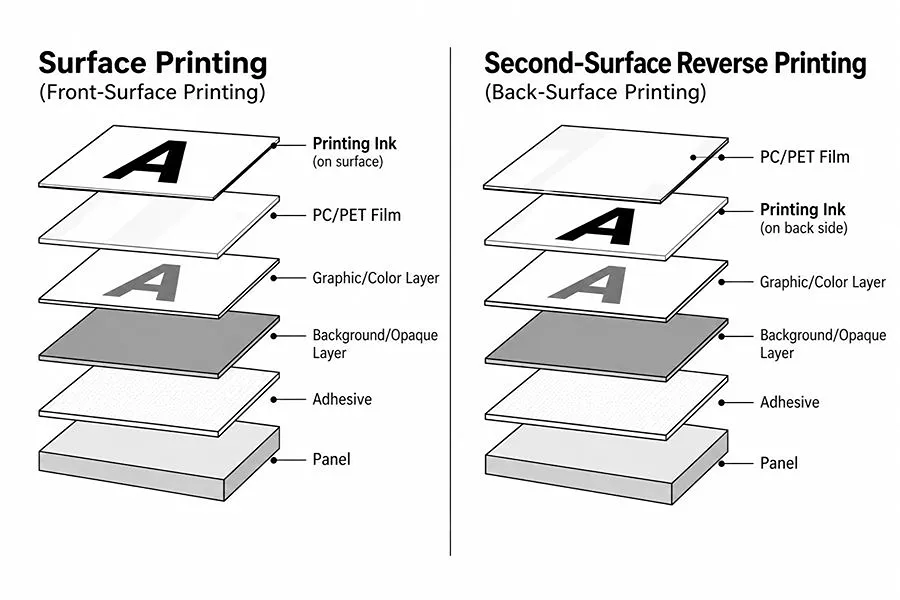
Layer Structures of Surface and Second-Surface Printing
2. Screen Printing
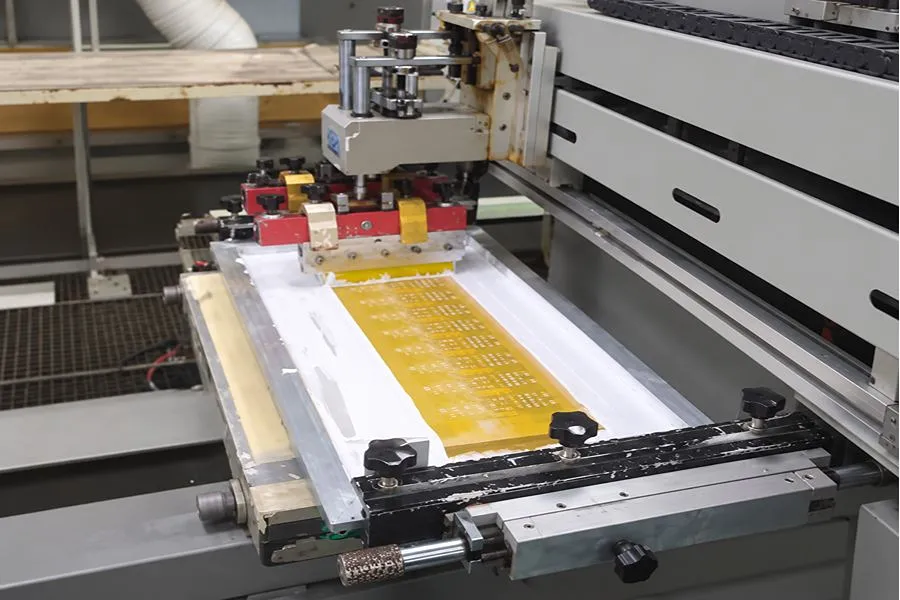
Screen Printing is one of the most common printing methods for Graphic Overlays.
Screen Printing
1) Screen Printing Process
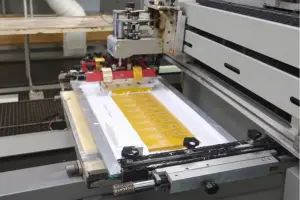
Screen Printing first creates an Artwork that is then used to make a Screen with open areas for ink to pass through. Ink is applied to the Screen and squeezed through the Mesh Openings with a Squeegee to transfer to the PC or PET Film and create the text, graphics or colour field desired in the print.
2) Color and Ink-Layer Characteristics of Screen Printing
Screen Printing can be used for solid-color graphics with definite boundaries or the use of premixed Spot Colors matched to Pantone, RAL or a customer-approved Color Sample.
Printing is done by transferring the ink through the Screen Mesh to the Film. The main factors that influence Ink Deposit are Mesh Count, Stencil Thickness, Ink Viscosity and Squeegee Parameters. The thickness and opacity of the ink layers can be adjusted through these parameters.
3) Screen Preparation and Production Characteristics
In Screen Printing, different colors and different layers of printing usually necessitate the use of separate Screens and the production process is completed in a predetermined printing sequence. In multicolour printing, each layer of ink has to be dried or cured before the next layer is registered and printed. The sequence of registration (from screen to screen) should be regulated so that the relative positions of text, color blocks, borders and other graphics remain unchanged.
4) Graphic Overlays Suitable for Screen Printing
Screen Printing is mainly suitable for Graphic Overlays based on Spot Color / Solid Color, projects requiring Pantone, RAL, or a specified Color Sample, and designs that include a White Background, Opaque Layer, Blockout Layer, Backlit Icons, or LED Window. It is also suitable for projects with fixed Artwork and repeated batch production.
3. Digital Printing
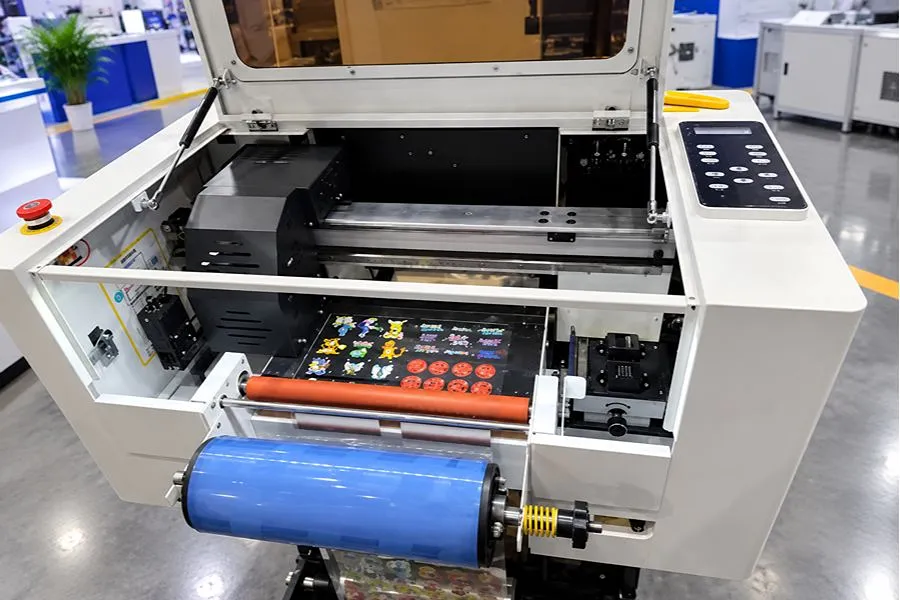
Digital Printing outputs graphics directly from Digital Artwork without preparing a separate Screen for each color.
Digital Printing
1) Digital Printing Process
The Digital Printing process is performed with an Inkjet Printhead printing Directly onto the PC or PET Film as per Digital Artwork. The text, graphic and colors are created by the position and combination of ink droplets. For UV Digital Printing, the UV Ink is sprayed onto the Film and then cured using the UV Light to create the printed layer.
2) Color and Graphic Characteristics of Digital Printing
CMYK Process Color Printing is normally the process followed in Digital Printing. This involves printing using combinations of different color droplets to get the final color result.
The other thing that Digital Printing can do is printing small text, lines, QR codes, serial numbers and many other similar things. In case one is printing Pantone color, then it is advisable to confirm the printed color sample as well as its Color Profile.
3) Production and Design-Change Characteristics
Digital Printing does not require Screen preparation and can proceed directly to printing once the Artwork is processed. When text, colors, or graphics change, only the Digital File needs to be updated; no new printing plate is required. Different Artwork can also be used within the same production batch, such as different languages, models, Serial Numbers, or QR Codes.
4) Graphic Overlays Suitable for Digital Printing
Digital Printing is mainly suitable for Graphic Overlays containing Gradients, Photographs, Multi-Color Logos, complex graphics, QR Codes, Serial Numbers, or Variable Data. It is also suitable for Prototypes, small batches, multiple SKUs, multilingual versions, and projects with frequent Artwork changes.
4. Pad Printing
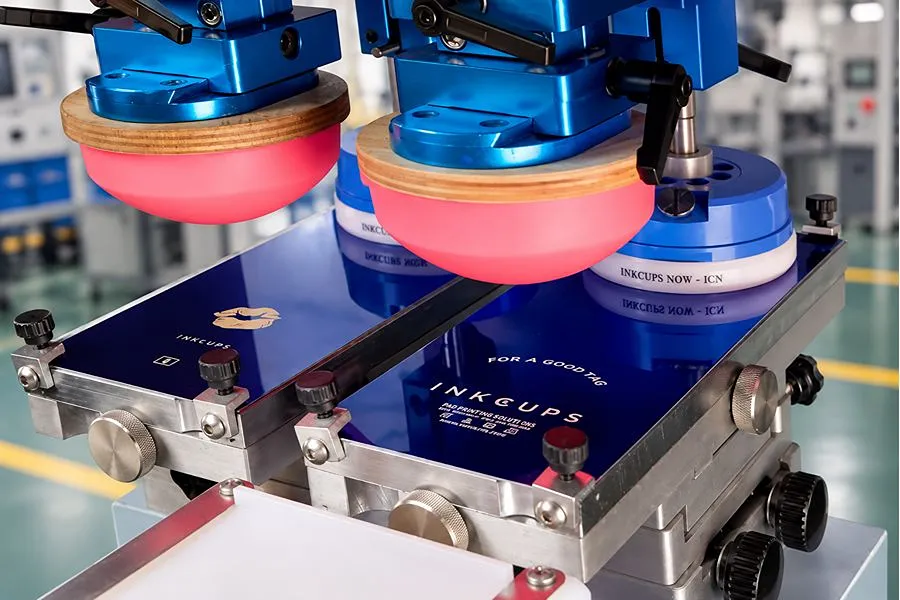
Pad Printing transfers ink with a Silicone Pad and is mainly used on curved surfaces, raised features, recessed areas, and localized irregular areas that are difficult to cover with flat-surface printing methods.
Pad Printing
1) Pad Printing Process
Pad Printing first forms the graphic on a Cliché / Printing Plate, with ink retained in the etched image area. The Silicone Pad presses against the Printing Plate to pick up the ink, then moves to the workpiece and transfers the graphic to the required printing position through a second pressing action.
2) Adaptability of Pad Printing to Curved and Localized Areas
The Silicone Pad is elastic and deforms when pressed against the product surface, allowing it to conform to a certain degree of Convex Surface, Concave Surface, Raised Area, and other localized irregular structures.
Pad Shape, Size, and Hardness affect the actual contact area and graphic transfer. If the curvature changes too sharply or the Pad deforms excessively, the printed graphic may stretch, compress, or shift in position.
3) Production Characteristics and Limitations of Pad Printing
Pad Printing requires a Printing Plate made for the graphic and a Silicone Pad matched to the printing area. Multicolor graphics require separate transfers for each color, with Registration controlled between colors.
The transfer area per Pad Printing cycle is limited by the Printing Plate, Pad Size, and product surface geometry. It is therefore not typically used as the primary printing method for large, flat Graphic Overlays.
4) Pad Printing Applications in Graphic Overlays
Pad Printing is mainly suitable for Logos, text, Symbols, and other localized graphics on Formed Overlays, curved surfaces, and locally raised or recessed areas.
5. Comparison of Screen, Digital, and Pad Printing
The main differences among Screen Printing, Digital Printing, and Pad Printing are the color-forming method, plate preparation, graphic type, and printable surface. The comparison is shown below:
| Comparison Item | Screen Printing | Digital Printing | Pad Printing |
| Printing Method | Ink transfers through Screen Mesh onto the Film | Inkjet Printhead outputs Digital Artwork directly | Silicone Pad transfers ink from the Printing Plate |
| Plate Preparation | Separate Screens are prepared for different colors and printing layers | No Screen required | Printing Plate required |
| Color Characteristics | Spot Color, Solid Color | CMYK, multicolor, and continuous tones | Primarily localized Spot Color |
| Graphic Characteristics | Solid-color text, color blocks, lines, and similar graphics | Gradients, Photographs, and complex multicolor graphics | Localized graphics such as Logos, text, and Symbols |
| Ink-Layer Characteristics | Ink-layer thickness and opacity can be controlled through Screen, Ink, and related parameters | Ink layer is determined by Inkjet settings, Ink, Printing Passes, and related parameters | Mainly used for localized ink transfer |
| Multiple Versions / Variable Data | Not suitable for frequent changes | Suitable | Not suitable for frequent changes |
| Flat Film | Suitable | Suitable | Can be printed, but not the primary application |
| Curved / Irregular Areas | Limited adaptability | Limited adaptability | Suitable |
6. Hybrid Printing Applications in Graphic Overlays
When a Graphic Overlay contains both complex full-color graphics and high-opacity solid-color layers, Screen Printing and Digital Printing can be combined.
1) Combining Screen Printing and Digital Printing
One way of doing it is to Digital Print the Gradient Layer, Multi-Color Logo, Photo and Complex Graphics and then Screen Print the White Background, Opaque Layer or Blockout Layer.
Digital printing the CMYK Graphic and then Screen Printing the Pantone / Brand Spot Color is another way. This is good for Overlays with complex full-colour graphics and specific solid colours.
A third option is Digital Printing on the Second Surface to print your main Graphic, and Screen Printing on the First Surface to add Selective Texture or other localized functional layers.
7. Conclusion
The Printing Process for a Graphic Overlay should be selected based on Graphic Type, Color Requirement, Ink Layer, Surface Geometry, and Production Volume. Screen, Digital, and Pad Printing each suit different graphic and structural requirements, and multiple printing processes can also be combined on the same Overlay.
If you are developing a new Graphic Overlay, you can send the Drawing or Artwork to iTrustFab. We can evaluate the appropriate Printing Process based on the colors, graphics, quantity, and panel structure.